|
Dragon Song - Gameplay Details
 Lunar's gameplay systems have changed relatively slightly over the years. The battle systems normally involve ranged combat (with the exception of WS and Legend), and characters normally have a range of strengths and weaknesses with physical attacks and magic (with the exception of WS and MS). Also, various equipment types and items throughout the game went along with regular leveling up to make characters stronger (with the exception of MS).
There were also some changes in map layouts, such as the reduced size of towns and dungeons between the originals and the remakes, the addition of visible enemies in the remakes, and removing overworld maps in the handhelds.
Lunar's gameplay systems have changed relatively slightly over the years. The battle systems normally involve ranged combat (with the exception of WS and Legend), and characters normally have a range of strengths and weaknesses with physical attacks and magic (with the exception of WS and MS). Also, various equipment types and items throughout the game went along with regular leveling up to make characters stronger (with the exception of MS).
There were also some changes in map layouts, such as the reduced size of towns and dungeons between the originals and the remakes, the addition of visible enemies in the remakes, and removing overworld maps in the handhelds.
 Lunar: Dragon Song borrowed some gameplay features from earlier Lunar games, but took many more liberties. Similarities include visible enemies on the screen (like the remakes), point-to-point navigation on the overworld (like Legend), and collectible cards (also like Legend). But the differences are numerous. For battles, DS: uses only 3-character parties, removes most magic spells, removes ranged combat, adds the distinction between front- and rear-line enemies, replaces user control with AI for targeting, and requires toggling between gaining experience or gaining enemies when leveling up.
For navigation, DS replaces both overworld and in-town navigation with a point-to-point system. Graphically, DS has cut-scenes similar to Lunar Legend, but no voices or animation. Lastly, DS: uses a collectible card systems where cards have actual in-game effects, and has a "Gad's Express" series of side-quests that let you earn money throughout the game.
Lunar: Dragon Song borrowed some gameplay features from earlier Lunar games, but took many more liberties. Similarities include visible enemies on the screen (like the remakes), point-to-point navigation on the overworld (like Legend), and collectible cards (also like Legend). But the differences are numerous. For battles, DS: uses only 3-character parties, removes most magic spells, removes ranged combat, adds the distinction between front- and rear-line enemies, replaces user control with AI for targeting, and requires toggling between gaining experience or gaining enemies when leveling up.
For navigation, DS replaces both overworld and in-town navigation with a point-to-point system. Graphically, DS has cut-scenes similar to Lunar Legend, but no voices or animation. Lastly, DS: uses a collectible card systems where cards have actual in-game effects, and has a "Gad's Express" series of side-quests that let you earn money throughout the game.
You can take a more in-depth look at the gameplay system of Lunar: Dragon Song below.
Battle System
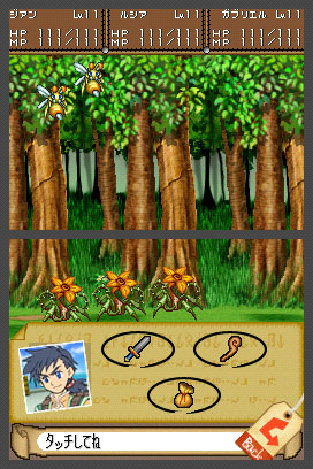
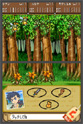 Like the Saturn and Playstation Lunar games, you can see enemies on the field in DS. You can also dash with the B button, but dashing depletes your characters' HP until you reach 1HP.
The battle system itself is also quite different. There are only 3 characters at one time. The combat area spans both screens, and enemies can be either grounded or in the air--only magic and ranged attacks can hit airborne enemies until the front line is cleared. There are only three options per player: Attack (physical attacks), Special (magic, skills, and healing), and Item (item and card use). However, the AI determines the target of the attack or magic spell. After battles, you can also obtain cards for some enemies. These cards have various effects, such as restoring HP, restoring MP, restoring status, attacking enemies, defending against attacks, protection from broken items, and so on. Lastly, blowing into the microphone will cause you to run from battle.
Like the Saturn and Playstation Lunar games, you can see enemies on the field in DS. You can also dash with the B button, but dashing depletes your characters' HP until you reach 1HP.
The battle system itself is also quite different. There are only 3 characters at one time. The combat area spans both screens, and enemies can be either grounded or in the air--only magic and ranged attacks can hit airborne enemies until the front line is cleared. There are only three options per player: Attack (physical attacks), Special (magic, skills, and healing), and Item (item and card use). However, the AI determines the target of the attack or magic spell. After battles, you can also obtain cards for some enemies. These cards have various effects, such as restoring HP, restoring MP, restoring status, attacking enemies, defending against attacks, protection from broken items, and so on. Lastly, blowing into the microphone will cause you to run from battle.
 There are two different battle modes in the game: Virtue Mode, which allows you to gain levels, and Normal Mode, which allows you to obtain items.
In Virtue Mode, once you defeat an enemy it turns from Dark to Light; once all enemies in an area are turned to Light, you regain HP and MP and can open any special blue-colored treasure chests in the area. In Normal Mode, once you defeat an enemy it simply respawns elsewhere in the area; but, this is the only way to obtain cards and items.
There are two different battle modes in the game: Virtue Mode, which allows you to gain levels, and Normal Mode, which allows you to obtain items.
In Virtue Mode, once you defeat an enemy it turns from Dark to Light; once all enemies in an area are turned to Light, you regain HP and MP and can open any special blue-colored treasure chests in the area. In Normal Mode, once you defeat an enemy it simply respawns elsewhere in the area; but, this is the only way to obtain cards and items.
The Coliseum
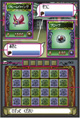
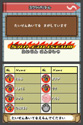 The Coliseum is a new feature in Dragon Song. To use this feature, you must first acquire cards through the normal game. Then, you can use the "Scratch Battle" system against both friends and random opponents through the DS network.
Cards have HP just like playable characters. In the Scratch Battle, if your card loses all its HP then the other player gets it; if you defeat your opponent's card, then you get theirs and hte HP of their card is restored.
The Coliseum is a new feature in Dragon Song. To use this feature, you must first acquire cards through the normal game. Then, you can use the "Scratch Battle" system against both friends and random opponents through the DS network.
Cards have HP just like playable characters. In the Scratch Battle, if your card loses all its HP then the other player gets it; if you defeat your opponent's card, then you get theirs and hte HP of their card is restored.
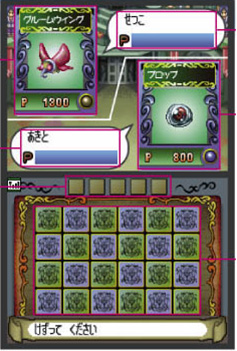
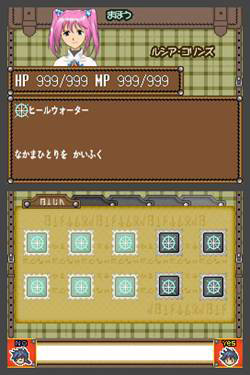
The Scratch Battle view is split across the two screens. The top screen shows your and your opponent's cards, and an HP meter of each. The bottom screen shows the "scratching area" as a 6x4 grid, with slots for 5 attack icons. To start, each player selects a card for battle, and then scratches one square off of the "scratching area"--the icons from that area determine the attack method. It continues from there.
The first player to finish scratching each area executes that attack. You can also earn bonuses depending on the number of potential attacks remaining. The battle is repeated until the HP of one side becomes zero, at which point the other player wins. If all squares are scratched off but neither has one, the match is drawn.
Menu Systems
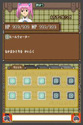
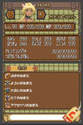 Being the first Nintendo DS RPG, Dragon Song allows very easy navigation through all its menus by enabling both the direction pad and touchpad.
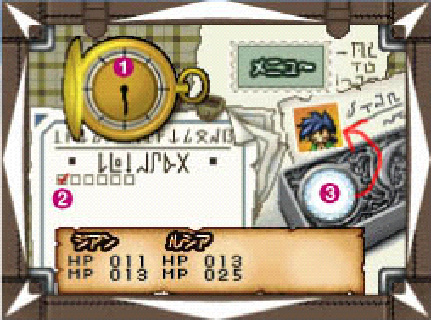
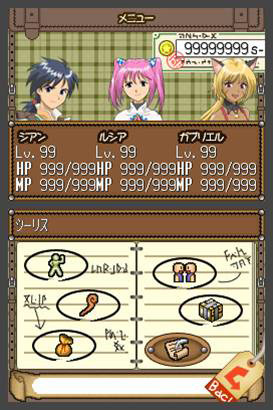
Using the battle menus, shop menus, and navigation, is all very streamlined and intuitive. The top/bottom division also lets it display all status information and the actual gameplay without one obstructing the other. Within the main menu, you can go through each character's stats, special attacks (magic, skills, etc.), items and equipment, system options, and assigned jobs.
Being the first Nintendo DS RPG, Dragon Song allows very easy navigation through all its menus by enabling both the direction pad and touchpad.
Using the battle menus, shop menus, and navigation, is all very streamlined and intuitive. The top/bottom division also lets it display all status information and the actual gameplay without one obstructing the other. Within the main menu, you can go through each character's stats, special attacks (magic, skills, etc.), items and equipment, system options, and assigned jobs.
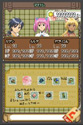
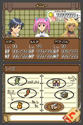 The items menu includes regular items, equipment, and assorted ingredients you collect for various Gad's Express jobs (which enable you to earn money throughout the game). Cards obtained during battle, and usable in various contexts, are also viewable this way.
The system menu has the usual save/load options, but also a "Music Hall" option to let you listen to the music throughout the game (which is actually quite good).
The items menu includes regular items, equipment, and assorted ingredients you collect for various Gad's Express jobs (which enable you to earn money throughout the game). Cards obtained during battle, and usable in various contexts, are also viewable this way.
The system menu has the usual save/load options, but also a "Music Hall" option to let you listen to the music throughout the game (which is actually quite good).
Gad's Express
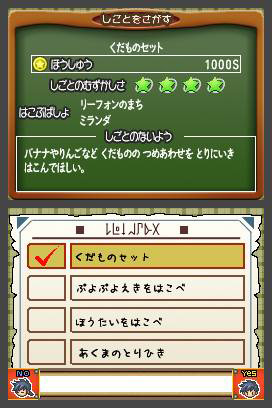
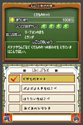 Gad's Express is the courier service that Jian and Lucia work for. Besides a story catalyst, the job also lets you take on various Assigned Jobs, which involve collecting various items that some enemies drop and delivering them to a specific person in a specific town. Doing these jobs lets you earn money in the game (enemies don't drop a lot of cash in this game). The more difficult the job, the greater the payoff.
You take on these jobs by going to a Gad's Express location in any town, and accepting an assignment (or two, or three). This will tell you what to collect, who to deliver it to, and where they can be found. But be careful: you can only take on a limited number of jobs at once, and if you have to cancel one then it'll cost you.
Gad's Express is the courier service that Jian and Lucia work for. Besides a story catalyst, the job also lets you take on various Assigned Jobs, which involve collecting various items that some enemies drop and delivering them to a specific person in a specific town. Doing these jobs lets you earn money in the game (enemies don't drop a lot of cash in this game). The more difficult the job, the greater the payoff.
You take on these jobs by going to a Gad's Express location in any town, and accepting an assignment (or two, or three). This will tell you what to collect, who to deliver it to, and where they can be found. But be careful: you can only take on a limited number of jobs at once, and if you have to cancel one then it'll cost you.
|